
Adding a client to your coaching program
You add a client by sending them an invite code. You create the code in the Coach Console, your client enters it in the NutriShot AI app, and their meals, weight, and trends show up on your dashboard. Each side takes about a minute.
Sign in to the Coach Console
The Coach Console is at coach.nutrishotai.com. Sign in with Google. The console is in beta, so access is by allowlist. If the sign-in page says your email is not on the allowlist, email support@questopiallc.com and we'll add you.
Create an invite code
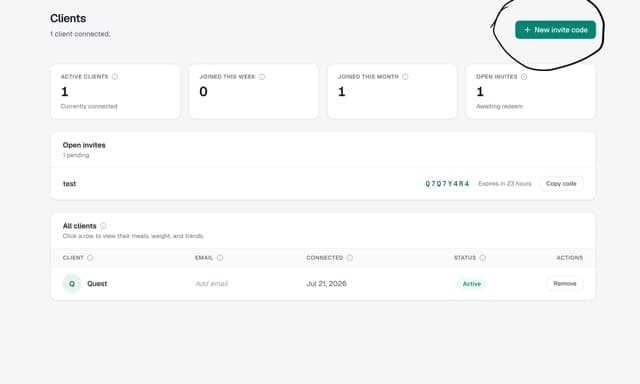
- Open the Clients page.
- Click New invite code in the top right.
- Enter the client's name and email if you want the invite labeled in your Open invites list. Both are optional.
- In the Share this code dialog, click Copy code and send the code to your client however you normally reach them.
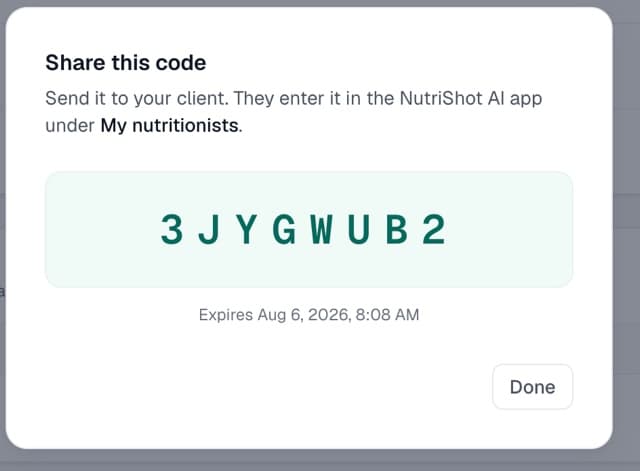
Unredeemed codes stay in the Open invites list on the same page, each with its own Copy code button. Send a code again from there if the first message got lost.
How invite codes work
- Codes are 8 characters, like 3JYGWUB2.
- A code expires 7 days after you create it.
- One code links one client. Create a new code for each person.
- Codes never contain 0, O, 1, I, or L, so nothing is ambiguous when you read one aloud.
- Case doesn't matter when your client types it in.
After your client redeems the code
Your client moves out of Open invites and into the All clients table with the status Active. Click their row to open their profile. From there you can see their meals, weight, and trends, and set their targets for calories, protein, carbs, fat, and target weight.
What your client does
Send these steps to your client along with the code. Your client follows them in the NutriShot AI mobile app.


- Tap the profile icon in the top right, then tap Settings.
- Scroll to the Coaching section and tap My nutritionists.
- Under Connect with a nutritionist, enter the 8-character code and tap Connect.
You then appear under Your nutritionists on that same screen, and you can see their logged meals, weight history, and trends. Your client can tap Disconnect there at any time, and your access ends immediately.
If a client's code doesn't work, check whether it's older than 7 days or already redeemed. In either case, create a new code for them.
Removing a client
Either side can end the connection. In the console, use Remove in the Actions column of the All clients table. In the app, your client taps Disconnect under Your nutritionists. Access stops right away, and you can reconnect later with a new code.
Related articles
Ask us directly
Email us and we'll help. We reply within 24 to 48 hours.
Email support